By trade · Locksmith
Mour for locksmith.
The scheduled work is where the money is — and where it's easy to lose track. Mour keeps your rekeys, smart-lock installs, and master-key rounds organized so the right blanks reach the right address every time, with photo proof on every job.
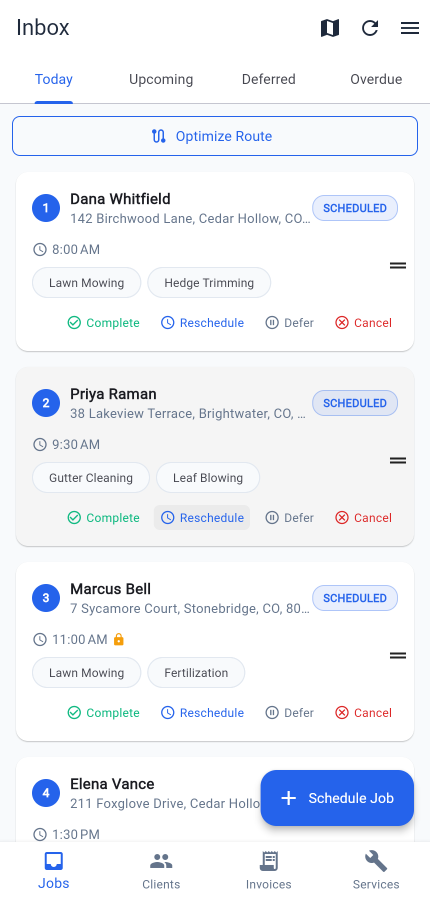
Built for the work
What locksmith operators run into — and how Mour handles it.
The scheduled rounds are most of the revenue — and the hardest to keep straight.
The snag: Rekeys, smart-lock installs, and master-key updates are booked work — but a plain calendar app loses track of what each one needs and when it's due.
In Mour: Book each one as a one-off or set it to recur — daily, weekly, bi-weekly, or monthly schedules itself forward. Every job carries a set time, so each round lands on the calendar with the prep and address attached.
Bringing the right blanks and tools to the right address.
The snag: A 6-pin Schlage SC1 rekey at Karen's, then a Medeco at Diaz's. Show up with the wrong blank and it's a wasted trip back to the shop.
In Mour: Keep a note on each job listing the blanks, cylinders, and tools it needs, so you pack the truck once and stop second-guessing. Notes are on every plan. On Professional, service requisites can also link a job to another service it depends on.
Proof of the lock's condition, before you touch it and after you're done.
The snag: "That cylinder was already cracked when you got here." Without a record, it's your word against the customer's.
In Mour: Open the job, capture a before photo, do the work, capture an after. Each one is timestamped and saved with the job — private to your business, never public. Photos are on every plan; Professional raise the per-job count.
A day in Mour
Your day, start to finish.
- 1Wednesday's scheduled rounds: rekey at Karen's, a smart-lock install at the Patel office, a master-key update for a property manager — all already on your Today list at their set times.
- 2Each job's note lists the exact blanks, cylinders, and tools to load — so you pack the truck once.
- 3On Professional, tap Optimize route to reorder the stops for the least drive time; any fixed-time appointment stays put.
- 4At each stop, open the job, capture before and after photos, and tap Complete.
- 5On Professional, an invoice drafts the moment you complete the job — review it, send the HTML email, and collect however you already do (Venmo, Zelle, cash, your own reader). Mour never touches the payment.
Pricing
Same plans as the rest of Mour.
Two simple plans, the same for every trade — free Hustler, or Professional when you outgrow it.
Hustler
Free
5 clients · 20 jobs/mo · 5 services
Professional
$14.99/mo
Unlimited + route opt + client texts + invoicing
“Looking for a solo locksmith who'll let us feature their workflow.”
Try Mour for locksmith.
Free on Professional, no card to start. You'll have your first job scheduled in minutes.
Prefer mobile? Get the app
Cancel anytime. Delete your account and you can restore everything just by signing back in within 30 days.