Scheduling
Add a client, pick a date, you're done. Recurring jobs walk forward on their own.
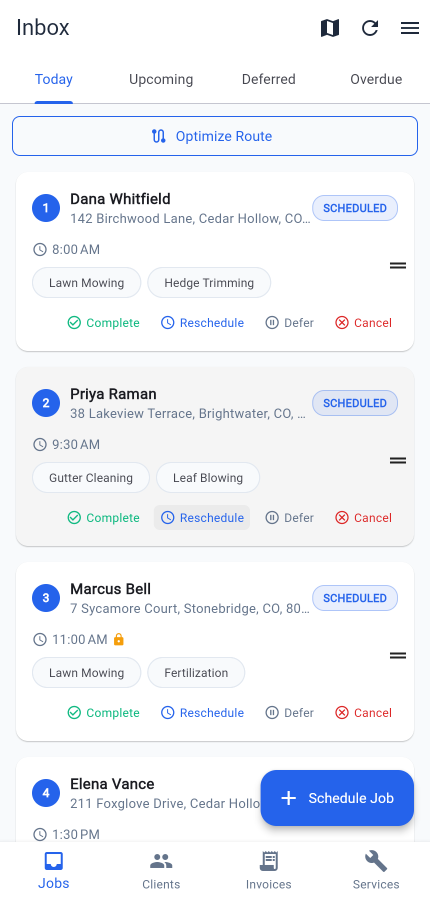
Scheduling in Mour isn't a calendar to wrestle with — it's a real job on a real date in a handful of taps. Open the inbox, tap Schedule Job, pick a client and an address, pick a service, pick a date and time. Done. The job lands in your Today or Upcoming tab, in order.
Recurring jobs
When the work repeats — weekly, bi-weekly, monthly, daily — set the recurrence right on the address's service pairing: Karen's address → Mowing → Bi-weekly. Complete a recurring job and the next occurrence schedules itself, so the route never has a gap. Available on every tier, including the free one.
If the next visit lands on a date that already has a job at that address — maybe you added a one-off gutter clean for the same day — Mour adds the recurring service to that existing visit instead of stacking a second trip on top. One drive, two services, no duplicate visit on your route. You get a push notification so you know what's now on the job.
No double-bookings
When you move a job, Mour checks it against your working hours, time off, and the jobs you already have. If something clashes, it flags it right there so you can pick another slot before saving.
Changing your hours never moves booked jobs
If you change your working hours, time off, or a client's preferred days after jobs are already on the calendar, those jobs stay exactly where they are. New bookings respect the new rules. If a booked job no longer fits your new hours, it simply waits in your Overdue list until you complete, reschedule, defer, or cancel it — your call.
Your booked work stays exactly where your clients expect it, and you decide case by case whether to move anything.
How it works
- Tap Schedule Job from the inbox.
- Pick a client, a service, a date and time.
- See the new job in your Today or Upcoming tab.
- Recurring jobs auto-schedule the next occurrence when you complete the current one.
- If a visit is already booked at that address on the next date, the recurring service merges into it — no duplicate trip.
- Reschedules check for conflicts inline and let you pick a different slot.
Good to know
- Changing your hours never moves jobs already on your calendar — you decide what to shift.
- Built for one operator, not a crew — if you dispatch a team, Jobber or ServiceTitan will fit better.
- Your jobs live as an ordered list, not a drag-and-drop calendar.
Plan:included on Hustler (all plans) and up.