By trade · Lawn care
Mour for lawn care.
Built for the one-truck lawn operator. Recurring mow-and-edge routes that schedule themselves, photo proof on every stop, and drive-time route optimization on Professional — no dispatcher software, no crew to manage.
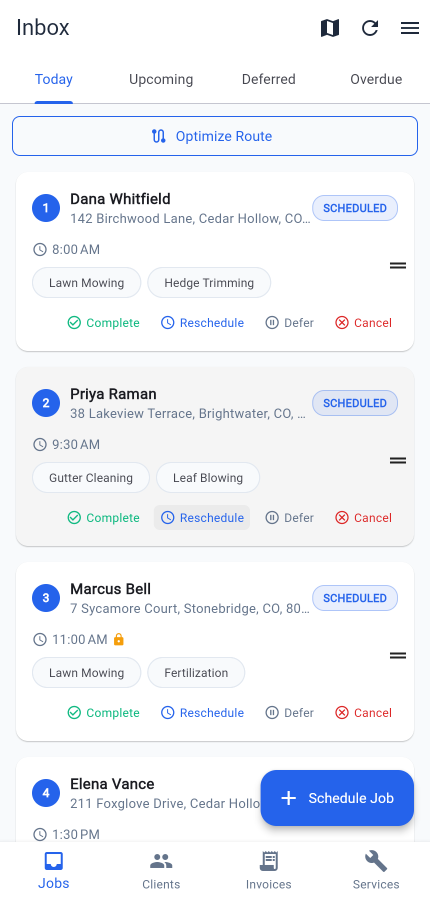
Built for the work
What lawn care operators run into — and how Mour handles it.
Recurring mow-and-edge routes that schedule themselves.
The snag: Karen is weekly, the Diazes are bi-weekly, the Patels are monthly. Every Sunday night you're squinting at a spreadsheet trying to work out whose week it is.
In Mour: Set the cadence once per client and service — weekly, bi-weekly, or monthly. Complete today's mow and the next visit is already on the calendar. No re-entry, no missed weeks.
Photo proof for when a customer says you didn't show.
The snag: "I got home and the yard looked untouched." You were there at 9am. But you've got nothing to point to, so you eat the complaint.
In Mour: Snap before-and-after shots on the job, then tap Complete. They're stamped to that visit and stay private to your business. Pull them up and the argument is over.
Route order built around drive time, not the map.
The snag: A six-mile hop across town at 5pm is 35 minutes. A twelve-mile straight shot at 10am is 17. Ordering stops by distance just burns your afternoon in traffic.
In Mour: On Professional, tap Optimize Route on a day with two or more mows. Mour sequences the stops to cut total drive time and pins them on a map — fixed appointment times stay locked where they are.
Group your week by area.
The snag: A 9am across town followed by an 11am two doors from your first stop means you crossed the same zip code twice before lunch.
In Mour: Set each client's preferred days, and their recurring visits land on the days you already work that part of town — so you can build tight, neighborhood-by-neighborhood routes instead of doubling back.
A day in Mour
Your day, start to finish.
- 1Tuesday morning, open the app. The Today tab lists every mow due, each with its scheduled time and the services for that stop.
- 2On Professional, tap Optimize Route and pick a starting point. Mour orders the stops to cut drive time and shows them as numbered pins on the map.
- 3At each property, open the job, snap before-and-after photos, then tap Complete.
- 4Tap Navigate to hand the next stop off to your phone's maps app for the drive.
- 5Complete a recurring mow and the next visit schedules itself forward — on the cadence and preferred days you set once.
Pricing
Same plans as the rest of Mour.
Two simple plans, the same for every trade — free Hustler, or Professional when you outgrow it.
Hustler
Free
5 clients · 20 jobs/mo · 5 services
Professional
$14.99/mo
Unlimited + route opt + client texts + invoicing
“Looking for a lawn care operator who'll let us feature their workflow.”
Try Mour for lawn care.
Free on Professional, no card to start. You'll have your first job scheduled in minutes.
Prefer mobile? Get the app
Cancel anytime. Delete your account and you can restore everything just by signing back in within 30 days.